Management of Comments and Analytical Observations
Description, Purpose and Objective
NOTE
The Comment Management view is the module in charge of consulting, sorting and exporting the system's general comment record (Module in Beta version).
A Comment records the observations and explanatory notes entered by users and is parameterized by the following components:
- Registration Date: Exact time stamp of the insertion.
- User: Name of the analyst or operator issuing the comment.
- Comment: Descriptive text or recorded observation.
The purpose of this view is to provide centralized access to feedback history and operational notes using data export and filtering tools.
Context of Use
This module is used by technical directors, coordinators and auditors to:
- See observation history: Filter notes recorded by specific users or by date.
- Export consolidated notes: Download the complete record of system observations for auditable support.
Possible Actions
1. Search Comments
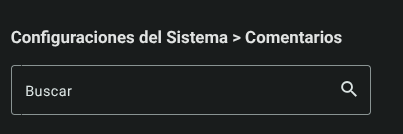
- Enter keywords or names in the search bar (Search) to filter the available comment history in real time.
2. Sort the Table
- Click on the column headers (Registration Date, User or Comment) to toggle the display in ascending or descending order.
- The view updates data in real time by filtering by text or changing the order of columns.

3. Export Comments
- Click the button **with the download icon (Export Comments) located in the upper right corner. The export action will directly generate and download the document with the comment records.
Roles and Permissions Required
The roles enabled to record and report data are Laboratory Analyst, Quality Director and Operator. The specific permissions required are:
- Entry of Results:
data_entry_read(for individual registration) anddata_entry_group_read(for mass registrations by group). - Modification / Edition:
data_entry_update(to correct results entered within the enabled shift). - Point Comments:
comments_readandcomments_createto add justifications or corrective actions in the control charts.