Mass Configuration of Multi Control Rules
Description, Purpose and Objective
NOTE
The Multi-Rules Configuration view is the statistical control panel designed to bulk define and apply analytical quality control rules (Westgard Rules) to multiple QC Tests or QC Groups in the organization simultaneously.
A Multi-Control Rule is a mathematical criterion based on standard deviations ($\pm s$) that evaluates whether the results obtained in daily analytical runs are under control or whether they reflect a systematic or random error. The system evaluates:
- Deviation ($\pm s$): The amount of dispersion allowed before triggering the alarm (e.g. $1s$, $2s$, $3s$, $4s$).
- Run Type: Defines whether the analyzed data belongs to the same analytical batch (Intra-run), to consecutive runs in time (Inter-run) or to Both types.
The objective of this view is to streamline laboratory administration, eliminating the need to configure Westgard multi-rules one by one for each assay and allowing control criteria to be standardized globally for complete analytical profiles.
Context of Use
This module is used by scientific management and quality assurance personnel to:
- Standardize analytical criteria: Ensure that an entire test profile (e.g. all tests in the Clinical Chemistry section) validate the results under the same Westgard rejection limits.
- Update control sensitivities: Massively adjust the rules (e.g. move the 1:2s rule from "Rejection" to "Alert") if false rejections are detected in the operation after periodic evaluations.
- Quick Startup: Configure control criteria for dozens of new measurands when installing a new clinical instrument.
Possible Actions
1. Select Bulk Configuration Mode
When entering the view, the system presents two main buttons to select the source of application of the rules:
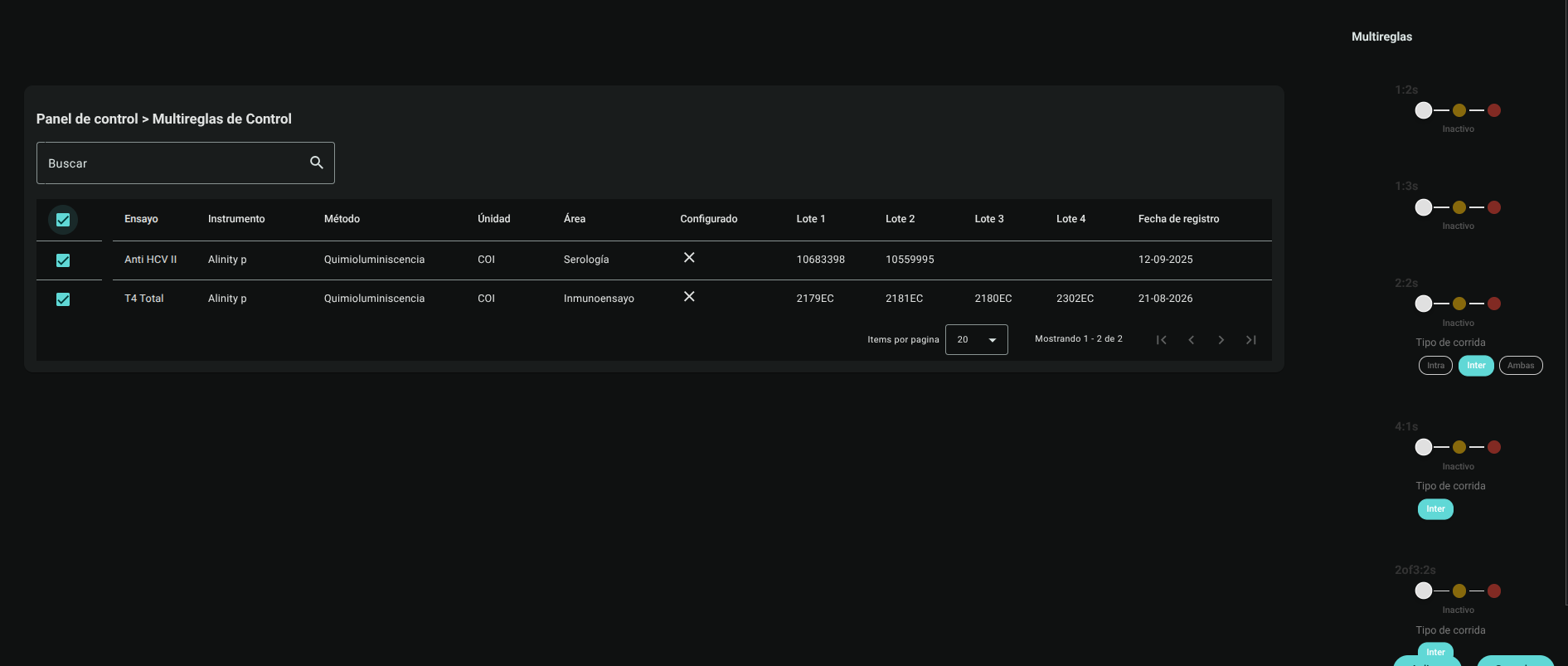
- New multi-rules per CC Test: Allows you to select individual tests to configure batch rules for them.
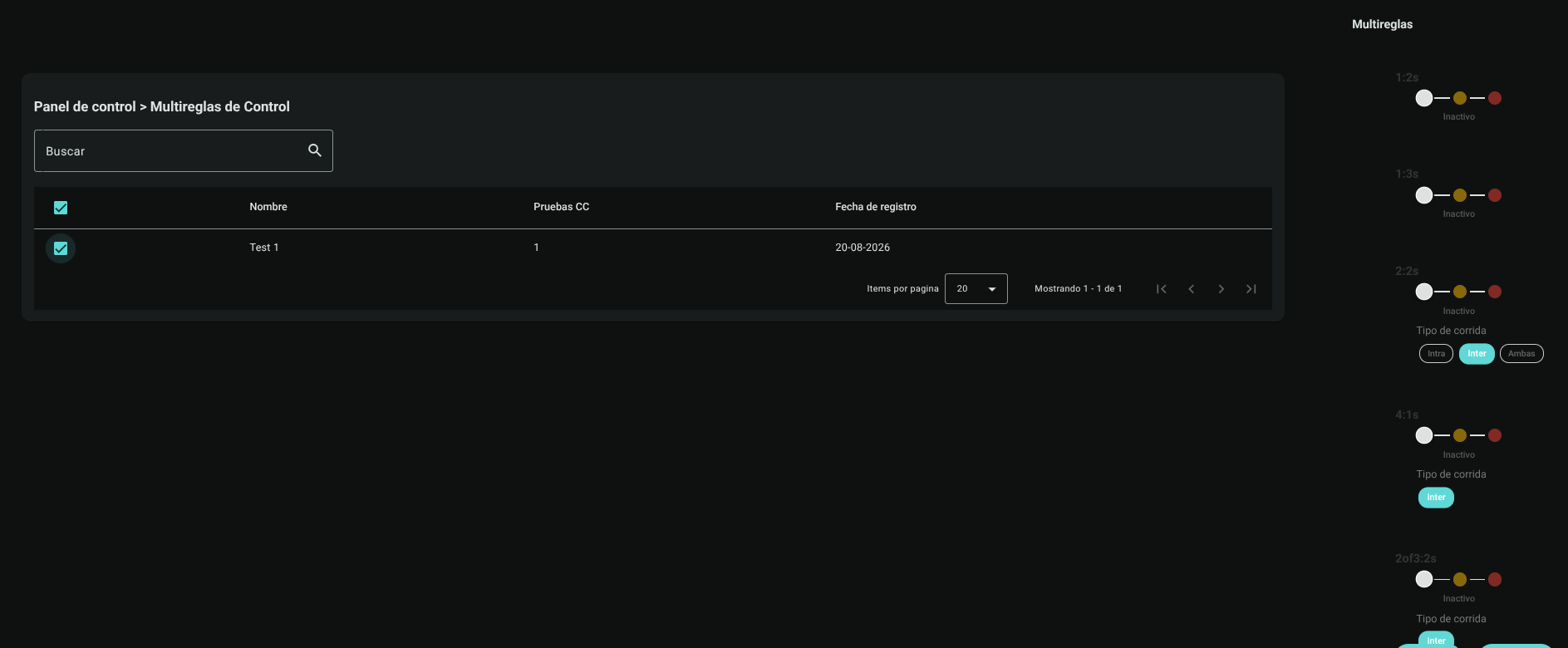
- New multi-rules per CC Group: Allows you to select preconfigured profiles (CC Groups) to apply the rules to all the tests that comprise them.

2. Configure Rules by CC Test
If you select the option to configure by CC Tests:
- Check the boxes of the desired tests in the CC Test Selection Table (e.g. Glucose, Urea, Creatinine).
- In the right side panel, complete the Multi-rules configuration matrix:
- Define for each Westgard rule (1:2s, 1:3s, 2:2s, R4s, 10x, etc.) its status: Inactive, Alert or Rejection.
- Select the deviations and the type of analytical run (Intra-run, Inter-run, Both).
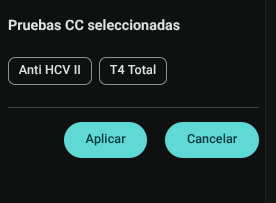
- The chosen tests will be displayed at the bottom as Chips. When you position the cursor over them, a tooltip will detail the analytical file for each test.
- Click "Apply" to inject the multi-rule configuration to all selected tests automatically.
3. Configure Rules by CC Group
If you want to standardize the rules for a complete clinical profile:
- Click "New multi-rules by CC Group".
- The system will present the CC Group Selection Table. Check the box for the desired group (e.g. Liver Profile).
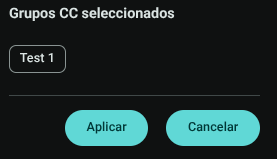
- Configure the Westgard Multi-Rule Matrix in the side panel. The system will display the label of the selected group.
- Click "Apply". The platform will search for all CC Tests that belong to the selected group and assign the new control parameterization to them simultaneously.
Westgard Rules Reference Table
The following summarizes the behavior of the Westgard statistical rules available in the selector:
| Rule | Error Type | Triggered Condition | Recommended Action if "Reject" |
|---|---|---|---|
| 1:2s | Warning Rule | A control data exceeds the limit of $\pm 2s$. | It serves only as a warning. Inspect the graph before rejecting the run; It is not recommended to configure it as rejection to avoid false discards. |
| 1:3s | Random Error | A control data exceeds the limit of $\pm 3s$. | Mandatory rejection. Indicates severe loss of precision or punctual failure; inspect for bubbles, pipetting, temperature, or reagent deterioration. |
| 2:2s | Systematic Error | Two consecutive (same control level) or simultaneous (two levels in the same run) data exceed $+2s$ or $-2s$. | Refusal of the run. Inspect calibration stability, control reconstitution or bias in photometer. |
| A:4s | Random Error | One data exceeds $+2s$ and the other control level in the same run exceeds $-2s$ (total amplitude of $4s$ intrarun). | Refusal of the run. Indicates acute analytical imprecision in the run; verify reagents and mixing components. |
| 4:1s | Systematic Error | Four consecutive data exceed $+1s$ or $-1s$ in the same direction with respect to the mean. | Alert or rejection according to Sigma metric. Indicates progressive analytical shift or bias; consider corrective calibration. |
| 10x | Systematic Error | Ten consecutive data points fall on the same side of the mean (sustained bias). | Persistent systematic deviation; recalibrate the method or inspect reagent lot change without readjustment. |
Action Protocol for Westgard Alerts and Rejections
IMPORTANT
Technical Resolution Route for the Bacteriologist:
- Identify the Nature of the Error:
- If the violated rule corresponds to a Random Error ($1_{3s}, R_{4s}$): The failure is associated with unpredictable pipetting variations, air bubbles in cells, voltage fluctuations, rapid evaporation or specific contamination of the vial. Repeat the measurement with a new, freshly thawed control aliquot.
- If the violated rule corresponds to a Systematic Error ($2_{2s}, 4_{1s}, 10_x$): The failure indicates a unidirectional bias due to alteration of the calibration curve, degraded reagent, evaporation of the calibrator, optical fouling or deviation in incubation temperature. Do not repeat the blind control without first calibrating or replacing reagent.
- Prohibition of Patient Processing: Any analytical run cataloged in Rejection status blocks the issuance and validation of patient results for that measurand until the root cause is documented and the control status is restored.
Roles and Permissions Required
Access to this parameterization module is reserved for the roles of Quality Director, Laboratory Coordinator and System Administrator. Requires the following technical permissions:
- Display and Audit:
multi_rules_read(allows you to consult the list, filter parameters and audit the current configurations). - Management and Writing:
multi_rules_create,multi_rules_updateand