New Quattrol365 Laboratory Migration
Description, Purpose and Objective
NOTE
The Quattrol365 New Laboratory Migration console is an administrative tool designed to restructure, standardize and securely transfer the entire configuration and analytical history of a laboratory from the previous architecture (version 1) to the new optimized database model (version 2) on the Quattrol platform.
The purpose of this module is to allow a transparent transition for the end user without loss of information, offering a controlled environment to simulate data transfer and validate the integrity and logical mappings (tests, measurands, methods, instruments, batches, calibrations and historical results) before consolidating the changes in the production environment.
Context of Use
This panel is operated exclusively by authorized system administrators, IT support personnel, or quality managers during the client upgrade process. It is used when:
- Migrating a lab whose Quattrol membership version is registered to the old model (
version: 'v1') is required. - A preventive audit of analytical data through technical simulations is needed to mitigate database inconsistencies before an update deployment.
Step by Step for Migration
To safely transfer laboratory data, follow the following operating instructions:
1. Select the Laboratory to Migrate
- Go to the Quattrol365 New Laboratory Migration module screen.
- Locate the Laboratory* text field and drop-down list.
- Type the name of the laboratory or select it directly from the autocomplete list.
- Note: The list will automatically filter only organizations that have their Quattrol membership configured in the previous version (
v1).
- Note: The list will automatically filter only organizations that have their Quattrol membership configured in the previous version (
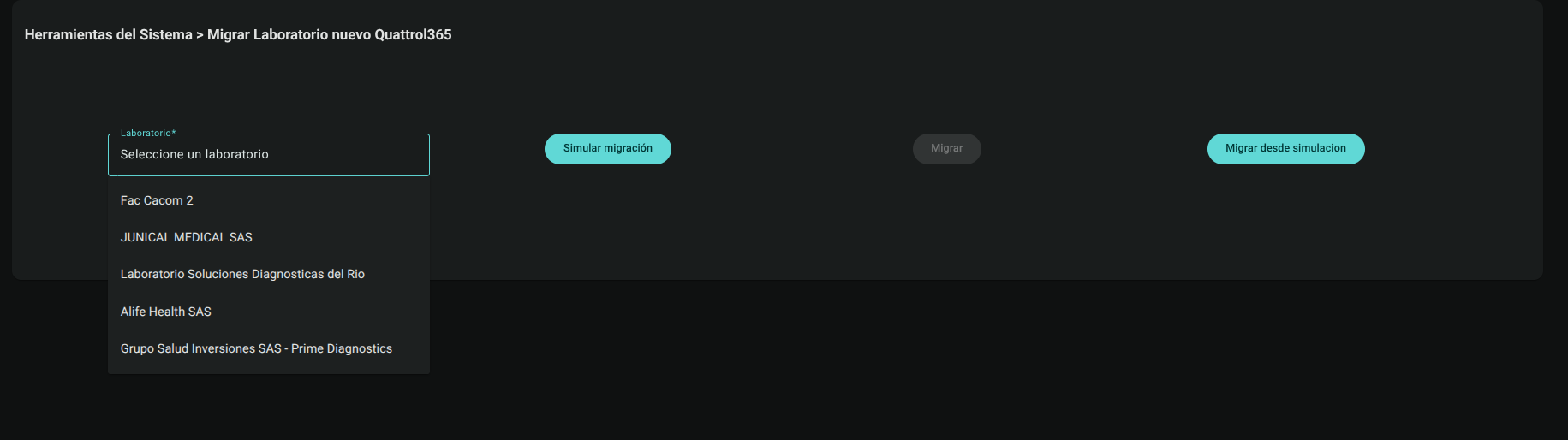
2. Choose and Execute the Migration Mode
Depending on the level of validation required in the procedure, click one of the available action buttons:
Option A: Simulate migration
This action performs a test or technical simulation of the complete transfer of information without altering the production operation of the laboratory.
- With the lab selected, click the Simulate Migration button.

- The system will begin the extraction of assays, measurands, methods, instruments, reagent lots, calibrations, averages and analytical results.
- The simulated data will be temporarily stored in a sandbox (
/migration/[ID-Organización]). - Wait for the notification to appear on the screen: "The simulation has completed successfully."
Option B: Migrate from simulation
Use this two-step flow after verifying that the presimulation process completed without integrity errors.
- With the lab selected and having successfully run the previous simulation, click Migrate from simulation.

- The database engine will take as a source the isolated backup generated in the simulation and inject it directly into the final productive collections.
- Upon completion, the organization membership will be automatically updated to the new version (
v2). - Check the confirmation: "The migration has completed successfully."
Option C: Migrate
This action executes the migration directly, immediately and definitively towards the new model.
- Make sure the selected lab is not currently operating critical transactions.
- Click the Migrate button.
- The system will extract and transform historical records in real time, writing them in direct block to the new database architecture.
- Wait for the console to process all batches of data and display the notification: "The migration has completed successfully."
Roles and Permissions Required
To access and interact with this advanced administration module, the user must have a IT Support or Super Administrator role and have the following specific permissions active:
- Access and display:
data_migration_read(for general restructuring consoles) ormigrate_lab_new_model_read(for updating laboratories to v2). - Write and execute operations:
data_migration_create/data_migration_updateormigrate_lab_new_model_create/migrate_lab_new_model_updatethat allow scripts to be launched on the production database.