Quality Control in Glucometers (POCT)
Description, Purpose and Objective
NOTE
The Quality Control in Glucometers console is the operational interface designed to capture, validate and record the results of quantitative tests and traceability metadata of glucometry devices in the POCT (Point of Care Testing) program.
The purpose of this module is to monitor and record the analytical performance of each glucose measuring device assigned per participant in fitness events. Its objective is to ensure the traceability of the process by evaluating thermal stability criteria of the samples, batches and expirations of the reaction strips, and linking photographic evidence of the results reported in $mg/dL$ to guarantee the consistency of the measurements at the points of medical care.
Context of Use
This panel is operated on a daily basis by:
- POCT Bacteriologists and Point of Care Operators: To enter the readings of the decentralized glucometers corresponding to the program samples and upload the supporting images of the device screens.
- Laboratory Directors and Quality Coordinators: To verify the traceability of the equipment serial numbers, ensure that the test strips are not expired and validate the evidence of the readings.
Step by Step for Participation Registration
Follow the technical procedure to capture and store device measurements:
1. Uploading the Participant Form
- Go to the Glucometers module screen (access through Dynamic Event).
- Click on the Participant Number* drop-down list.

- Type or select from the autocomplete list the ID of the participant assigned to the event.
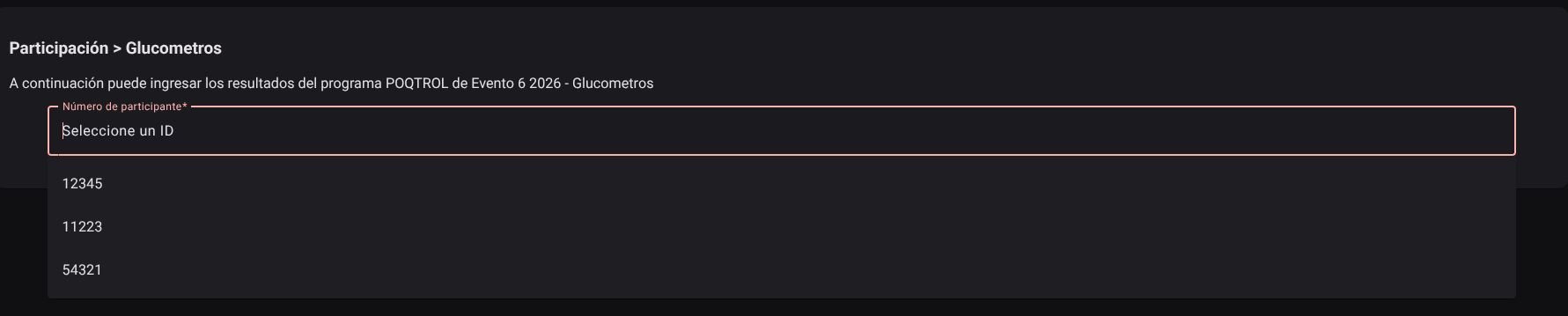
- The system will automatically load the sample matrix and stability form corresponding to said participant.
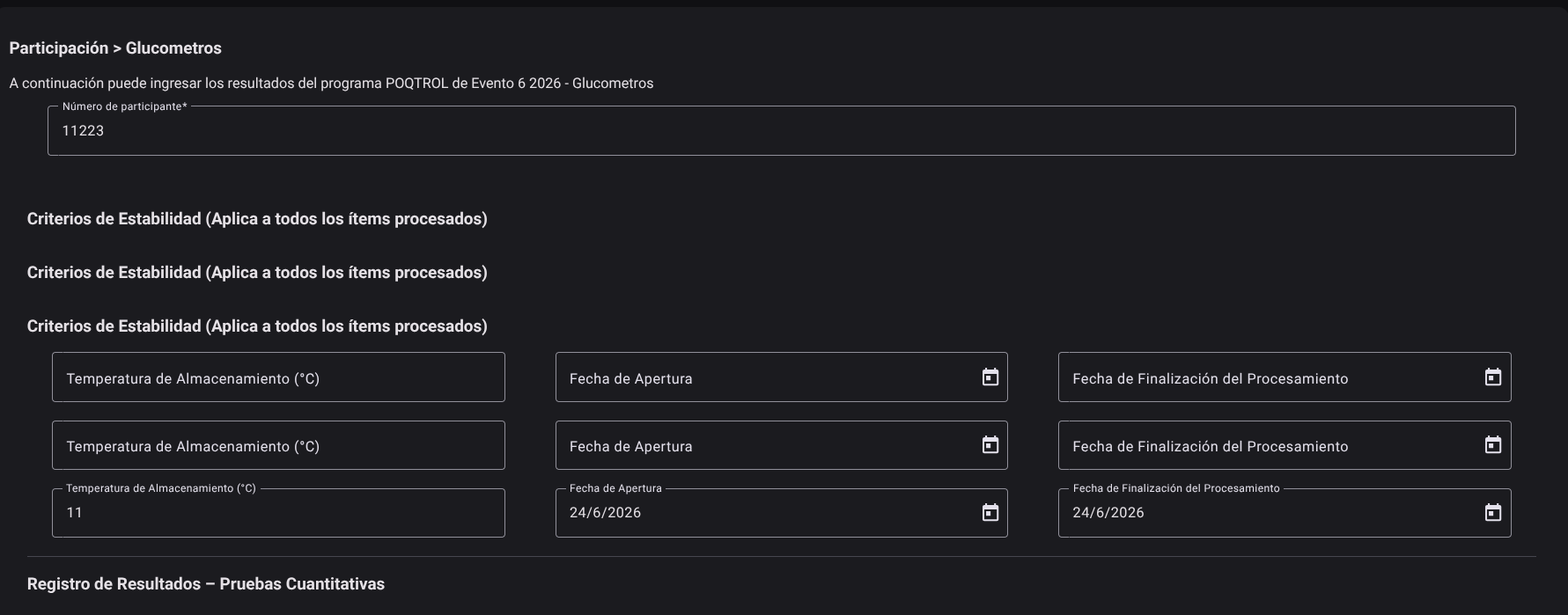
2. Complete Sample Stability Criteria
Before recording individual sample readings, complete the curation metadata that applies to the entire block:
- Storage Temperature (°C): Enter the numerical value of the average temperature recorded in the area where the event samples were stored.
- Opening Date: Click on the field and select the processing start date from the calendar.
- Processing Completion Date: Define in the calendar the day on which the measurement of the sample block was completed.

3. Record Quantitative Results per Sample
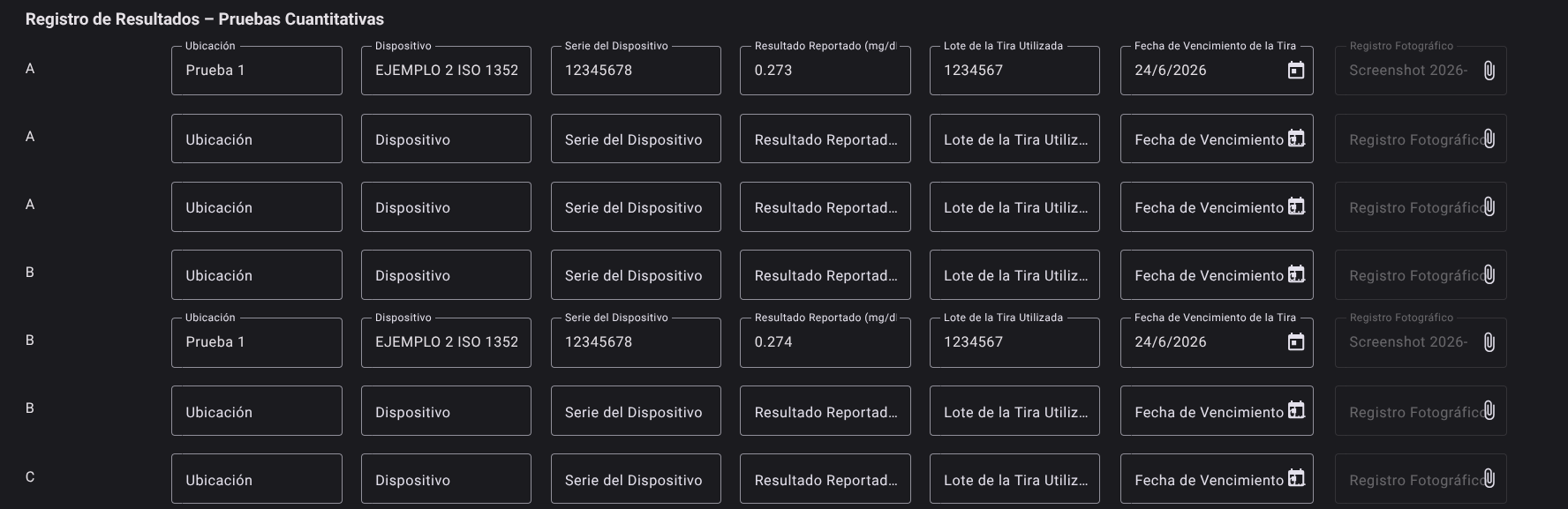
For each of the clinical samples of the event (rows identified sequentially as A, B, C, D, etc.), complete the following fields in the matrix table:
- Location: Indicate the service or area where the device is assigned (e.g. Emergency Room, Floor 3).
- Device: Select the glucometer model used from the list of enabled devices.
- Device Serial: Enter the unique serial number of the reading glucometer.
- Reported Result (mg/dL): Enter the numerical value obtained after processing the physical sample.
- Lot of Strip Used: Enter the lot reference printed on the packaging of the test strips.
- Strip Expiration Date: Select the expiration date for the lot of strips on the calendar.
- Photographic Record: Press the attachment upload button to upload the backup image (photograph of the glucometer screen that shows the filing and the test result).
4. Save Participation
- Upon completing all assigned samples and stability fields, scroll to the bottom of the screen.
- Review the system reminder alert: "Remember to take the Technical Competency Assessment".
- Click the Save button to consolidate the results.
- The system will validate data consistency (avoiding logically inconsistent date ranges or empty batches) and save the entry to the database server.
Good Metrological Practices in POCT Testing (ISO 22870)
NOTE
- Strip and Expiry Control: Never process samples with lots of strips whose expiration date has passed. Electrochemical biosensors based on glucose oxidase or glucose dehydrogenase experience loss of sensitivity and progressive enzymatic drift.
- Calibration Code Verification: Make sure that the calibration chip or lot code programmed into the glucometer strictly matches the test strip bottle in use before lancing and reading.
- Photographic Support: The uploaded image must clearly display the glucometer screen with the numerical value in $mg/dL$ and the sample identifier, constituting the primary auditable evidence to certify the operator's competence in the quality assurance program.
Roles and Permissions Required
Data entry and consultation of participation in glucometers is governed by the following security scheme:
The roles authorized to enter this data are Bacteriologist / POCT Analyst, Device Operator and Quality Director.
- Visualization and Consultation:
dynamic_event_read: Allows read access to the glucometer event screen and upload of participant data.
- Capture and Modification:
dynamic_event_create/
- Elimination:
dynamic_event_delete: Allows you to discard or restart the results form in case of reevaluation authorized by the quality director.