Entry and Registration of Technical Competence Evaluations
Description, Purpose and Objective
NOTE
The Competency Assessment Entry console is the operational interface designed to formally capture, complete and record the technical competency tests of the organization's health personnel.
The purpose of this module is to centralize both the responses to aptitude evaluations (questionnaires and clinical cases) and the demographic, work and academic metadata of the evaluated participant. Its objective is to ensure compliance with accreditation and continuous certification regulations, guaranteeing that the history of technical qualification and suitability of laboratory analysts is robustly recorded in the system.
Context of Use
This panel is operated in the management routine by:
- Laboratory Directors and Coordinators: To supervise, apply and record the mandatory periodic evaluations of their collaborators.
- Auditors and Quality Inspectors: To verify the traceability and history of qualifications, certifications and academic training records of professionals linked to sample processing.
Step by Step for the Evaluation Record
Follow the following instructions to correctly complete and store a competency assessment:
1. Identification and Loading of the Form
- Go to the Proficiency Assessment screen.

- Locate and click on the Participant Number* drop-down field.

- Type or select from the autocomplete list the ID of the participant being evaluated.
- When selected, the platform will automatically load the corresponding questionnaire and the tabs associated with the participant in the lower section.
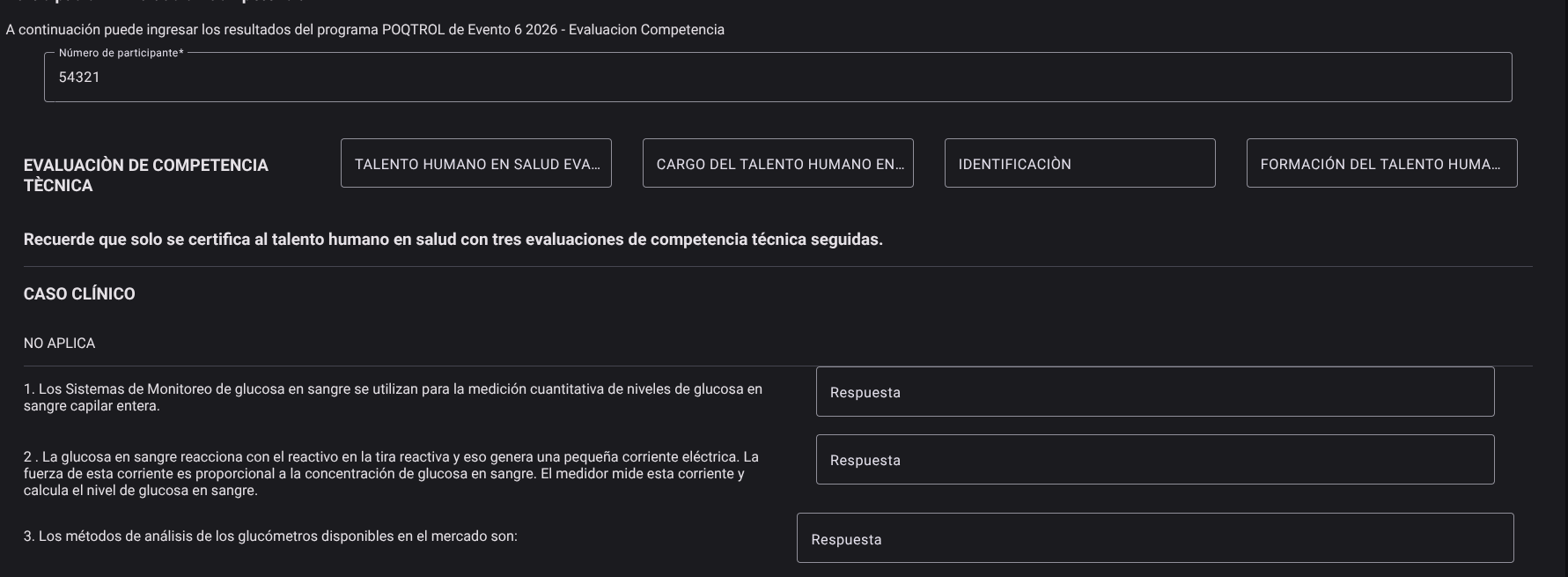
- Regulatory Notice: The system will display active certification notifications and regulatory notices on the screen (for example, the requirement and alert of the compliance status of three minimum consecutive evaluations to maintain the aptitude certification).
2. Navigation and Completion of Sections (Upper Tabs)
The registration form is divided into tabs that organize the required information clearly. Navigate between them to enter the information:
- Technical Competence Evaluation:
- Presents the statements, clinical cases and technical questions assigned to the program.
- For each question, click on the Answer field and select the alternative from the drop-down menu (supports multiple choice or True / False mode questions).
- Evaluated Human Talent in Health: Details the basic demographic information of the evaluated health professional.
- Position: Allows you to select and register the position or function that the person exercises within the laboratory structure.
- Identification: Registration and validation of the official identification document.
- Training of Human Talent: Structured field to record the academic training, postgraduate courses and current complementary courses of the participant.

3. Saving the Evaluation
- Once you have completed the technical questionnaire and completed the demographic and position information in the upper tabs, scroll to the bottom of the screen.
- Click the Save button.
- The system will verify the integrity of the data entered. By confirming the transaction, you will save the answers and immediately update the participant's competition history in the database.

Assurance of Technical Competence according to ISO 15189 (Clause 5.1 / 6.2)
NOTE
- Mandatory Periodic Evaluation: The international standard ISO 15189 requires periodically evaluating and documenting the technical competence of all personnel involved in the pre-analytical, analytical and post-analytical phases.
- Appropriateness and Re-training Criteria: A score below the program's minimum threshold (typically $< 80%$) or critical errors in the resolution of clinical cases requires the immediate formulation of a plan for continuous technical training, temporary supervision of analytical runs and documented re-evaluation before reestablishing the unsupervised technical signature on patient results.
Roles and Permissions Required
The administration and registration of technical competence evaluations is regulated under the following security scheme:
The roles enabled to operate this console are Technical Directors, Heads of Human Resources and Quality Coordinators.
- Reading and History:
family_competences_read: Allows read access to the competency evaluation view, participant list and template upload.
- Entry and Modification (Writing):
family_competences_create/family_competences_update: Grant authorization to fill out technical questionnaires, modify position metadata and human talent identification, and save the completed form in the system.
- Elimination:
family_competences_delete: Allows you to discard or cancel evaluation records in case of administrative inconsistencies.