Event Documents
What is it and what is it used for?
NOTE
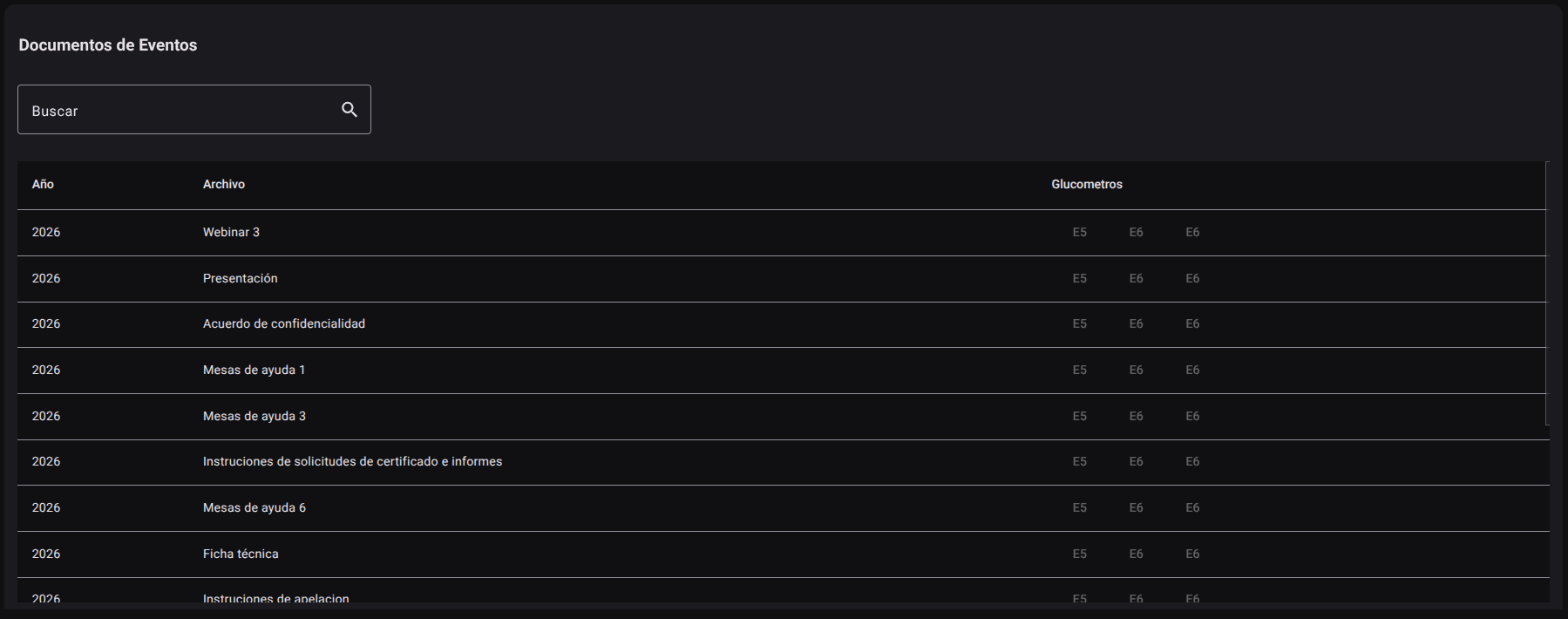
The Event Documents view is the digital library where you can easily find and download all files, guides, and reports for the events and evaluation rounds in which your laboratory participates.
How is the information organized?
The table displays documents clearly across the following columns:
- Year: The year corresponding to the event.
- Document: The document or report name (such as Performance Report Interpretation, Participant Summary, instructions, or attachments).
- Columns by Program or Area: Displays the different areas (like Chemistry, Hematology, Urinalysis, etc.):
- General document: If the document applies to the entire year, you will see a single direct download icon button.
- Documents by version: If the event has multiple rounds, you will see buttons with each version code (e.g.,
E1,E2,E3) to download the file for that specific round. - Not available or not enrolled: If your laboratory is not enrolled in that program or the document has not yet been made available for download, you will see a dash (
—) or the button will appear disabled.
Actions you can perform
1. Search for a document
Type the document name or year in the Search field. The table instantly filters matching results.
2. Sort the table
Click the Year or Document column headers to sort records in ascending or descending order.
3. Download a file
- Locate the document row and the desired program column.
- Click the download button or version number button you need.
- The file will download immediately to your device or open in a new browser tab.
Required permissions
The following role permissions are required to interact with this view:
event_documents_read: Allows entering and viewing the event documents module.event_documents_list: Allows listing and querying available documents in the table according to your laboratory's enrollments.